

Billing and monthly extras
Team and Business are billed in two parts: the subscription base you pay at checkout, and monthly extras for usage above the plan’s included allowance. Extras are request overage and prorated extra seats, plus tax where it applies. Logged requests and routed provider spend stay visible as usage metrics but are not billed: there is no logging surcharge and no token markup.
Prices and what is included
Section titled “Prices and what is included”| Plan | Base, monthly / annual | Requests included each month | Extra requests | Seats included | Extra seat, per month |
|---|---|---|---|---|---|
| Developer | Free | 50,000 | Not billed (hard cap) | 2 | No additional seat |
| Team | $49 / $490 | 500,000 | $9 per 100,000 | 10 | $10, prorated |
| Business | $249 / $2,490 | 3,000,000 | $6 per 100,000 | 30 | $10, prorated |
| Enterprise VPC | From $12,000 per year list (contracted) | 10,000,000 | From $5 per 100,000, graduated and aggregate-metered | 50 console seats, 500 protected identities | Per contract |
| Enterprise Self-Hosted | From $24,000 per year list (contracted) | 25,000,000 | From $5 per 100,000, graduated and aggregate-metered | 50 console seats, 1,000 protected identities | Per contract |
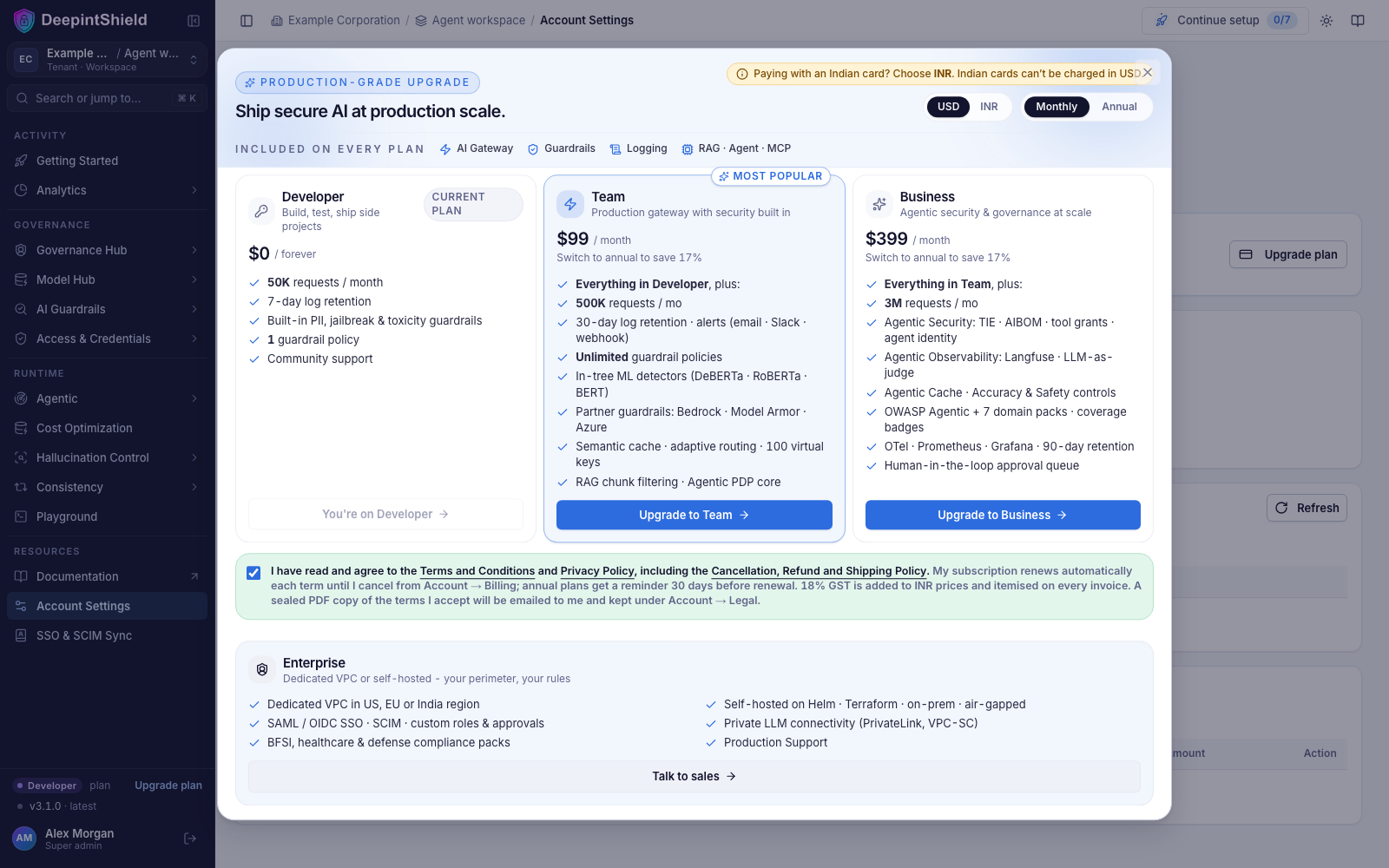
Indian customers are invoiced in INR at the prevailing reference rate plus 18% GST; the amount shown at checkout is the amount charged.
Enterprise plans are contracted and billed annually; the list prices (from $12,000 per year for Enterprise VPC and from $24,000 per year for Enterprise Self-Hosted) are informational and the contract invoice governs. Enterprise VPC includes one production data plane, 50 console seats, 500 protected identities, and 10,000,000 governed requests a month; Enterprise Self-Hosted includes up to three production clusters, an air-gapped delivery option, 50 console seats, 1,000 protected identities, and 25,000,000 governed requests a month. Usage above the allowance is graduated on the excess and metered on aggregate counters: extra requests are $5 per 100,000 for the first 20,000,000 over, $3 per 100,000 for the next 75,000,000, and $2 per 100,000 beyond; each additional protected identity is $0.60 per month for the next 1,000, $0.40 for the next 4,000, $0.25 for the next 10,000, and $0.15 beyond.
Some rules that decide the amount:
- One request allowance is shared by every tenant and workspace in the organization. Billing months are calendar months in UTC.
- Extra request blocks are rounded up: 500,001 requests on Team incur one $12 block.
- Team and Business keep serving requests after the allowance is used; the
additional usage accrues extras. Neither has a hard cap: Business is
recommended past 3,000,000 requests a month, and past 10,000,000 talk to us
about Enterprise. Developer has no overage path, so its cap rejects further
governed requests with HTTP 429 (
plan_request_allowance_exceeded) until the month resets or the account upgrades. The Developer plan also caps seats at 2: a third invitation, or a third person’s first sign-in through SSO, is refused with HTTP 402 until the organization upgrades. Rate limits and budgets you configure still apply on every plan. - A person occupies one seat across the organization’s membership levels. Pending invitations, unverified password accounts, and users deactivated through SCIM are excluded; owners and recognized SSO accounts count. Extra seat charges are weighted by the time spent above the included allowance during the month.
- Annual base payment does not prepay a year of extras. Request allowances reset monthly and extra seats accrue monthly.
Seeing and paying extras
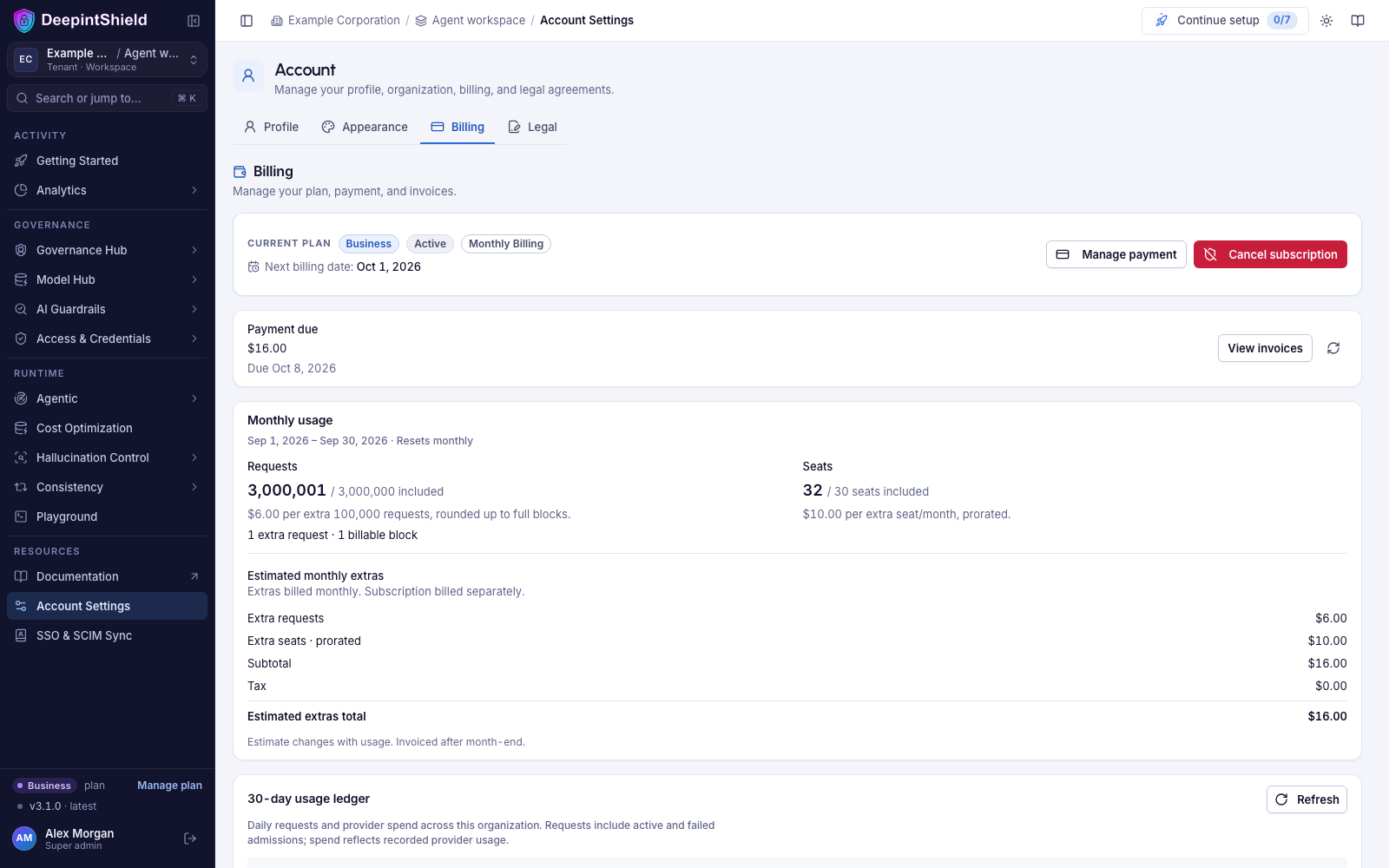
Section titled “Seeing and paying extras”Open Account → Billing. The Monthly usage card shows the month’s requests against the included allowance, the current seat count, unit rates, and an estimate of the extras including tax. The estimate excludes the subscription base and is not a demand for payment; it reads zero until the first paid billing cycle is recorded, which can be shortly after an upgrade.
After the month closes, a separate Monthly extras invoice appears in the invoice list:
- A positive invoice is collected through a Razorpay payment link (use Pay on its row) or, when you have enabled AutoPay, through your UPI mandate.
- Zero-value invoices are marked paid without any payment request.
- Paying an extras invoice settles that invoice only; it does not renew or change the subscription. Cancelling the subscription stops future base renewals, and extras already accrued remain payable.
UPI AutoPay for extras (INR)
Section titled “UPI AutoPay for extras (INR)”INR accounts can choose Enable AutoPay on the Billing tab. Enrollment asks for explicit consent to a separate UPI mandate, an authorized maximum per invoice (default ₹15,000 including tax; you can choose a lower amount), and a zero-value authorization through Razorpay. The mandate lasts one year and must be renewed when it expires. Your base subscription’s authorization does not enroll you automatically.
USD invoices, missing or expired mandates, and invoices above the authorized maximum use payment links instead. Turning AutoPay off stops new debit submissions; a debit already submitted is still reconciled. After a confirmed debit failure the service retries after 24 hours and again after 72 hours. After three definitive failures the invoice falls back to a payment link with the original due date.
Overdue invoices and service access
Section titled “Overdue invoices and service access”The Billing tab shows outstanding balances, the due date, any restrictions in force, and a link to unpaid invoices. Using more than the plan allowance never suspends Team or Business by itself; only an unpaid invoice does.
| Time relative to an unpaid invoice’s due date | What happens |
|---|---|
| Due date | Payment is requested. Service continues. |
| Days 1 and 3 | Reminder to the billing owner. Service continues. |
| Day 7 | New seats, invitations, and resource creation are blocked. Existing requests continue. |
| Day 14 | Gateway requests and MCP execution are suspended. Billing and payment pages stay available. |
| Verified settlement | Restrictions clear as soon as the remaining balance no longer triggers them. |
Reminders go to the organization’s billing owner on days 0, 1, 3, 7, and 14. The clock starts only when a real payment demand is recorded: an abandoned checkout or an unissued estimate never starts it. The oldest unpaid demand controls the dates, and a new month or a different active tenant does not clear debt.
There is also an unpaid-extras credit limit, twice the monthly base including tax (Team $198; Business $798). When unpaid extras reach that limit and at least one invoice is overdue, requests are suspended early. Base renewal invoices follow the normal 7-day and 14-day rule. Balances in different currencies are never combined.
A previously paid recurring subscription keeps its plan features while its base renewal is being collected. Seat accrual pauses while requests are suspended and resumes after payment is verified. The service does not delete account data as a collection action.
Plan changes
Section titled “Plan changes”- Upgrades happen through checkout. Paid features switch on when the payment is confirmed.
- A downgrade or cancellation from Account → Billing takes effect at the end of the current paid term, so you keep what you paid for. The API accepts only the plan field for this change; tariffs, allowances, and currency are managed by checkout.
- Orders whose gross total is above the deployment’s bank-transfer threshold (by default ₹5,00,000 including GST, or the USD equivalent) are invoiced for bank transfer instead of charged to a card, and the plan activates when the payment is received. No self-serve plan on the October 2026 card reaches the default threshold.
Next steps
Section titled “Next steps”- Virtual keys - set per-key budgets and rate limits so usage stays inside the allowance you expect.
- Budgets and limits - hierarchical spend controls across keys, teams, and customers.